
Moderate blog comments and block spam
Better Blog Comments gives you one place in Shopify admin to read, approve and answer every comment on your blog. Spam protection is on from the start, so most junk never reaches you.
Moderation and spam protection are part of every plan. On the Free plan, you can approve, edit and reply to your first 25 comments. Compare plans on the Better Blog Comments app listing.
Moderate comments from the dashboard
- Open Better Blog Comments.
- Filter the list by Approved, Pending or Spam.
- On a comment, choose what to do: approve or unapprove it, reply as your store, edit it, Mark as spam or Mark as not spam, or delete it.
To act on several comments at once, select them first. To clear the whole queue, click Approve all pending.
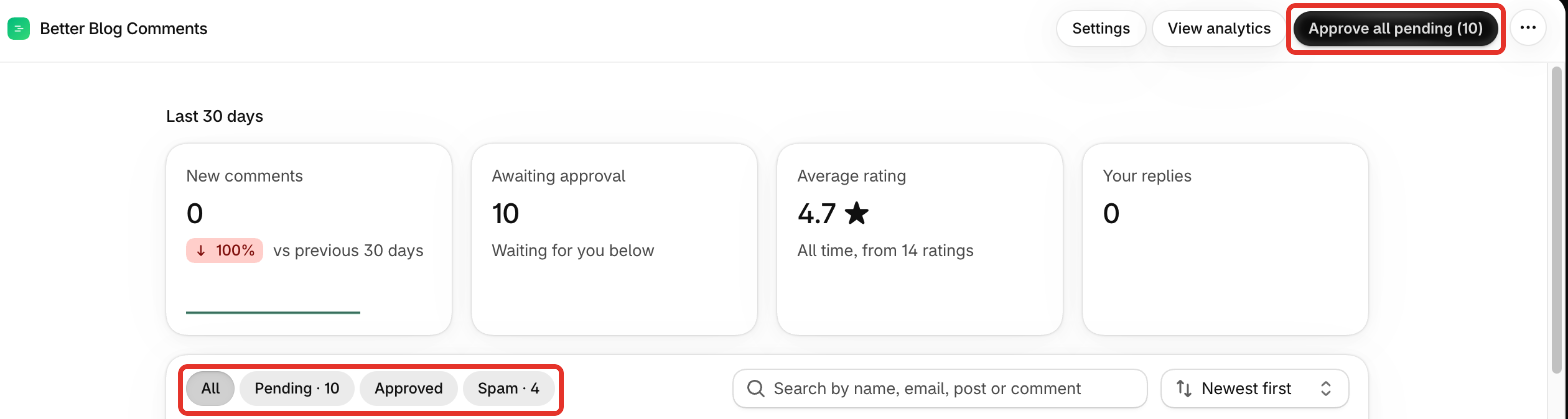
A real comment ended up in Spam? Open the Spam filter and click Mark as not spam.
Moderate from your inbox
You get an email for each new comment. Reply to it, and your answer posts on the blog.
Block spam
A spam check, a bot trap and a rate limit run on every comment, with nothing to set up. See How does the built-in spam protection work?. To see every comment before it goes live, see How do I require approval for blog comments?. If bots still get through, add a CAPTCHA: see How do I add a Cloudflare Turnstile CAPTCHA to blog comments?.
What's next
- Get an email when someone comments on your blog: set where alerts go and answer by email.
- Add star ratings to Shopify blog posts: let readers rate your posts as they comment.